In short
Candy AI Private Content is a set of photo and video packs attached to individual characters, found under “My Private Content” on a profile and in a Private Content item in the sidebar. Your Collection gallery stores media you generated or unlocked. The packs we priced, Mila Nowak’s, cost 290 tokens each, nearly three months of Premium’s 100 monthly tokens, so check each pack’s screen before you spend anything.
What Candy AI Private Content is
The name sounds like a locked drawer, and that’s roughly right: it’s the drawer, and Candy has put a label on it.
Candy AI Private Content is a set of photo and video packs attached to individual characters. Each character profile has a section called “My Private Content,” and the profile panel previews her packs (Mila Nowak, 21, showed a “+41” counter). Candy also gives Private Content its own sidebar item, a filter on the browse page and a tile on character cards, so you’re unlikely to miss it.
Think of it as the pre-made counterpart to generation. A pack is a ready-made set of media tied to one character, while the AI image generator makes images to order. Candy Shorts is a third thing again: scripted episodes.
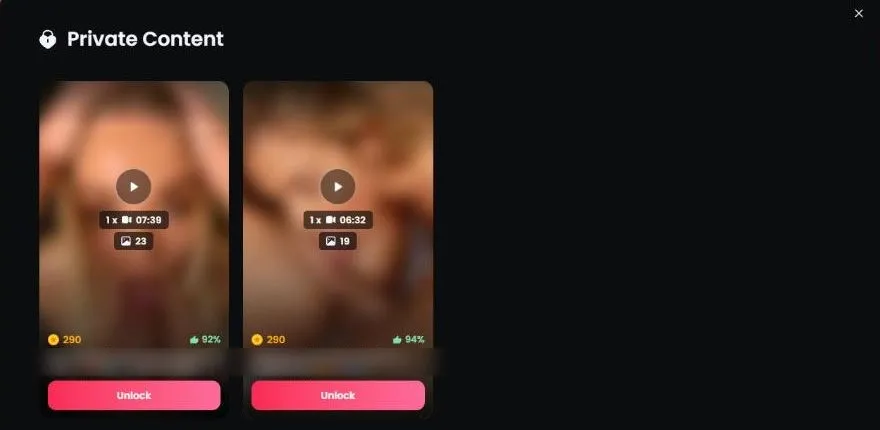
Here’s what I could verify from a free account. Mila Nowak’s packs list a video length, a photo count and a rating before you pay, and her two packs cost 290 tokens each: one has a 7:39 video plus 23 photos (rated 92%), the other a 6:32 video plus 19 photos (rated 94%). What I couldn’t verify is how other characters’ packs are priced, so treat 290 as the one data point we have, not a rule. Guessing a price on a page like this is how people end up annoyed at a stranger on the internet.
Where to find Candy AI Private Content
Candy scatters Private Content across the interface, which is helpful once you know where to look.
| Where | What you’ll see |
|---|---|
| Sidebar | A Private Content item |
| Browse page (Girls tab) | A Private Content filter, plus a Private Content tile on character cards |
| Character profile | “My Private Content” in the profile panel, previewing that character’s packs with video length, photo count and rating |
| Inside a chat | A Private Content icon in the header, beside Shorts, the phone call and the profile panel |
The fastest way to browse is the filter. Apply Private Content on the browse page and open the profiles that come up. The tile on each card is Candy’s hint that there’s something behind it.
If you’re coming from Candy Shorts, you’ll notice the same pattern: a Shorts tile on a character card means she leads a series, and a Private Content tile means she has packs. Two tiles on one card means she has both.
Our AI girlfriend chat guide covers the browse page filters in more detail.
Collection: where your media lives
Collection is Candy’s gallery. It stores media you generated or unlocked, which means images and clips you make in chat end up there, along with anything you unlock. Candy’s own line is “All unlocked content is automatically added to your gallery,” so a pack you unlock lands in Collection on its own.
Candy also notes that when you delete chat media, it stays in your gallery. In plain terms: clearing a chat is not the same as clearing your Collection. If you’re tidy by nature, that’s worth knowing. If you’re a hoarder, it’s a feature.
Two practical points. First, Collection is useful as a record of what you’ve made, which pairs well with the AI video generator and its 12-token Scene Videos. Second, if you share a device, remember that a gallery is a gallery. Log out when you’re done, the way you would with any account.
On the money side, Candy’s charge shows as “EverAI” on a card statement, which is the discreet part. Our safety guide covers the billing descriptor, the operator and the published policies.
I’ve learned to treat Collection like a camera roll I’m slightly afraid of. It’s all fine. I just keep it closed on trains.
What Candy AI Private Content costs
This is the part I most wanted to answer, and now I can: the two packs we looked at, both Mila Nowak’s (she’s 21), cost 290 tokens each. One holds a 7:39 video plus 23 photos (rated 92%), the other a 6:32 video plus 19 photos (rated 94%). That’s one character’s packs, so I can’t tell you what every pack costs.
Here’s the baseline Premium picture, so you know your budget before you open one:
| Plan (US) | Per month | Billed |
|---|---|---|
| 12 months | $3.99 | $47.88 |
| 3 months | $8.99 | $26.97 |
| 1 month | $13.99 | $13.99 |
Premium includes 100 tokens a month, so a single 290-token pack is nearly three months of your allowance. For comparison, a 5-second Scene Video is 12 tokens, a locked Shorts episode is 12 tokens (30 on Candy Creators series), and a standard five-episode series is 36 tokens to finish. One pack costs about as much as eight of those series, or 24 Scene Videos. On the annual plan, if you count the subscription as nothing but tokens, a pack works out to about $11.60.
The monthly 100 tokens won’t get you there on their own, and extra tokens are a Premium-member thing: the token store isn’t available on a free account (it redirects), and we didn’t see top-up prices, so I won’t quote any.
My rule: read the pack screen first, compare what it asks with those numbers, then decide. At 290 tokens, a pack costs more than finishing a Candy Creators series three times over, and I want to be very sure I’ll look at it more than once.
Candy runs seasonal sale banners from time to time, but the 70% off the annual plan is applied automatically, no code needed. The wider breakdown is on our Candy AI pricing page.
Private Content vs generated images vs Shorts
Candy has three kinds of visual content, and each answers a different want.
| Private Content | Generated images and videos | Candy Shorts | |
|---|---|---|---|
| What it is | Ready-made photo and video packs per character | Made to order from chat or a tool | Scripted vertical episodes |
| Where | Character profiles, sidebar | Chat bar, Generate Image | The Shorts player |
| Costs | 290 tokens a pack (Mila Nowak’s) | 12 tokens per Scene Video; image price not verified | 12 tokens an episode (30 on Creators series) |
| Free part | Profile previews only | None, it’s Premium | Episodes 1 and 2 of non-Spicy series |
| Best for | A set built around one character | A specific moment you want to see | A story with a cliffhanger |
If you know which character you want, packs get you a finished set without describing anything. If you want something in particular, generation is the more flexible route. And if you want a plot, nothing on Candy beats a free Shorts episode: browse the series catalog and sample a few episode 1s before you spend a token.
I think of it as groceries, cooking and takeout. Packs are what’s in the fridge. Generation is cooking something specific. Shorts is the delivery that arrives with a cliffhanger on top.
Is Private Content worth it? My verdict
Candy AI Private Content is worth exploring, but it’s priced like a splurge. The idea is solid: if you already like a character from chat or Shorts, a pack tied to her is the natural next step. The execution is easy to find, with the sidebar, the filter, the card tile and the profile section all pointing the same way.
Value for money is where it gets steep. At 290 tokens, Mila Nowak’s packs (roughly 6 to 8 minutes of video and about 20 photos each) cost nearly three months of Premium’s token allowance. Candy shows the video length, photo count and rating up front, which helps, and unlocked packs land in your gallery automatically. We only priced one character, though, so check each pack’s screen, compare it with what your tokens buy elsewhere and spend deliberately.
The honest downsides: 290 tokens a pack, which is more than Premium’s monthly allowance; one character’s prices is all we verified; and one more thing competing for the same budget as episodes, videos and calls.
Start free; if you’re going to finish more than one series a month, the annual plan at $3.99/mo is the cheapest way in. Make the free account, open the Private Content filter and see what Candy shows you. Looking costs nothing, and my accountant has stopped asking what I’m looking at.
What’s good
- ✓ Packs are tied to characters you already know from chat or Shorts
- ✓ Easy to find: sidebar item, browse filter, card tile and profile section
- ✓ Collection keeps everything you generated or unlocked in one gallery
- ✓ Mila Nowak’s packs show video length, photo count and a rating before you spend
What to know
- • At 290 tokens a pack (Mila Nowak’s), it costs nearly three months of Premium’s token allowance
- • We only priced one character’s packs, so other prices may differ
- • Competes for the same budget as episodes, Scene Videos and calls
- • A gallery on a shared device needs a little care