In short
The Candy AI image generator is a Premium tool that makes 18+ images of AI characters; a free account just gets an “Upgrade to Unlock” prompt. There’s a standalone Generate Image tool, plus an Image button in the “Show me the scene” bar of any chat. Premium starts at $3.99/mo on the annual plan. We couldn’t verify a per-image token price, so I won’t quote one.
What the Candy AI image generator is
I tested Candy’s image tools on a Tuesday night, and my Collection tab has opinions about how I spent it.
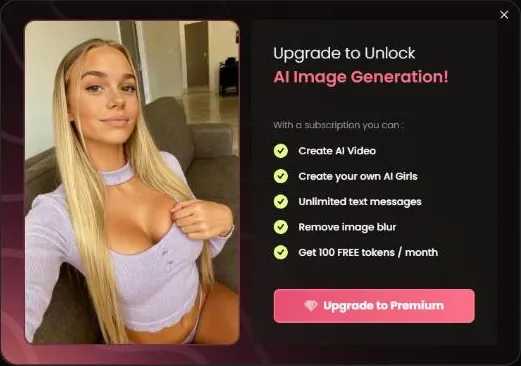
The Candy AI image generator is a Premium feature. Candy’s plans page lists “Generate 18+ Images” among the benefits, and a free account hits an “Upgrade to Unlock” prompt (its perk list mentions Remove image blur and 100 tokens a month). It lives in the sidebar as Generate Image, and there’s a second entry point that starts from one of Candy’s characters, which saves you from beginning at zero.
You don’t have to leave a conversation to get a picture, either. Every chat has a “Show me the scene” bar with Image and Video buttons, so an image can come straight out of the moment you’re in.
“18+” means adults only. The tool is for adult users, and the characters on Candy are fictional adults.
Looking for a Candy AI image editor? We haven’t verified one. The two tools covered here are the ones we confirmed, and I’d rather list two real things than six hopeful ones.
Two ways to make Candy AI images
Candy gives you two doors into image generation, and they suit different moods.
| Generate Image tool | Chat Image button | |
|---|---|---|
| Where | Sidebar, with a separate start-from-a-character entry | The “Show me the scene” bar in any chat |
| Starts from | The tool itself, or a Candy character | The moment in your current conversation |
| Best for | A picture of a character you already like | Capturing what just happened in the chat |
Both routes lead to the same place afterward. Candy’s Collection is a gallery that keeps media you’ve generated or unlocked, so nothing disappears into the void. We cover the gallery, along with character packs, in our Private Content guide.
If you want images of a particular character, starting from that character beats describing her from scratch. If you want images that match a story you’re already telling, the chat button wins. I use the chat bar more, mostly because I’m lazy and it’s already open.
How to get started with the Candy AI image generator
Here’s the route as far as we verified it, with the gaps marked.
- Make a free Candy account. An account is required, and sign-up doesn’t ask for a card.
- Get Premium. “Generate 18+ Images” is a listed Premium benefit, and on a free account image generation stops at an “Upgrade to Unlock” prompt.
- Open the tool. Pick Generate Image in the sidebar, or press Image in the chat bar.
- Check your Collection. Generated media is kept there, so it’s the first place to look if a picture seems to have gone missing.
What I’m not going to do is walk you through the controls on the generator screen. It sits behind that paywall, so we didn’t map its options, and describing buttons I haven’t verified is how guides end up wrong. Candy’s on-screen prompts handle that part, and they’re clear enough.
One more thing worth knowing: Candy publishes a Blocked Content Policy and Community Guidelines. Stick to fictional adult characters and you’ll never need to read either closely. Read them anyway if you’re the kind of person who reads terms of service for fun. No judgment, and some respect.
What does the Candy AI image generator cost?
Here’s the part where I’d love to hand you a neat price per image. I can’t. Per-image token pricing wasn’t something we could verify: a free account hits the “Upgrade to Unlock” prompt before any price appears, so any number you see elsewhere on this is a guess or a stale screenshot.
What I can give you is the Premium picture:
| Plan (US) | Per month | Billed |
|---|---|---|
| 12 months | $3.99 | $47.88 |
| 3 months | $8.99 | $26.97 |
| 1 month | $13.99 | $13.99 |
Premium includes 100 tokens a month and the “Generate 18+ Images” benefit. For scale, a 5-second Scene Video costs 12 tokens, and a locked Shorts episode costs 12 as well (30 on Candy Creators series). Extra tokens are a Premium-member thing too: the token store isn’t available on a free account, and I won’t quote top-up prices. Plans renew automatically and show up as “EverAI” on a card statement.
Candy runs seasonal sale banners from time to time, but the 70% off the annual plan is applied automatically, no code needed. Before you use the Candy AI image generator, read the cost on the screen. It’s the one price I’d never take on trust, including mine. The wider breakdown lives on our Candy AI pricing page.
Getting better results from any image tool
These tips are general rules for AI image tools, not Candy-specific features, so treat them as habits rather than promises about Candy’s screens.
- Be specific about the scene. Setting, mood, lighting and clothing beat vague adjectives every time.
- Ask for one idea per image. Three ideas in one request is how you get none of them.
- Use the character you’re already chatting with. Starting from a character keeps her look consistent from one image to the next.
- Think about the frame. Close-up, full length or wide scene: naming the shot you want saves you a retry.
- Iterate. Your second attempt is almost always better than your first, because now you know what the tool ignored.
- Keep it adult and fictional. That’s Candy’s rule and mine.
I treat image generation like ordering from a menu in a language I half speak. The first order comes out strange. By the third, I’m ordering like a local.
If you’re choosing between making a picture and watching something, remember Candy’s free Shorts episodes cost nothing. Not every urge needs a generation.
Generator, Scene Video or Shorts: which should you use?
Candy has three ways to see a character, and they’re not interchangeable.
- Image generator or chat Image button: a still, made to order. Best when you know the picture you want.
- Scene Video: a 5-second clip of a chat moment for 12 tokens. See our AI video generator guide.
- Candy Shorts: pre-made, scripted vertical episodes with English subtitles. Episodes 1 and 2 of every non-Spicy series are free with a Candy account, so browse the series catalog before you spend anything.
Pictures are the cheapest way to explore a character’s look. Shorts are the best way to meet her in a story. The chat is where she answers back, which is covered in our AI girlfriend chat guide.
Make the free account, watch a couple of episodes, then decide whether the Candy AI image generator deserves a spot in your Premium budget. Start free; if you’re going to finish more than one series a month, the annual plan at $3.99/mo is the cheapest way in.
What’s good
- ✓ Two ways in: a standalone Generate Image tool and an Image button in every chat
- ✓ Can start from one of Candy’s characters instead of from scratch
- ✓ Results are kept in your Collection gallery
- ✓ Included in the same Premium plan as chat, from $3.99/mo on the annual plan
What to know
- • We couldn’t verify a per-image token price, so check before you generate
- • Locked behind Premium: a free account only sees an “Upgrade to Unlock” prompt
- • We didn’t verify an image editor, so don’t expect one
- • Results depend on how well you describe what you want